ServiceX User Guide
This guide covers the core concepts and workflows of ServiceX for users who are new to the service. It is one part of a broader suite of documentation available in the navigation bar above.
Users who have completed the 15-minute Histogram challenge will find this guide to be the logical next step. It revisits the same material at a higher level of detail to build a thorough understanding of how ServiceX works.
What is ServiceX
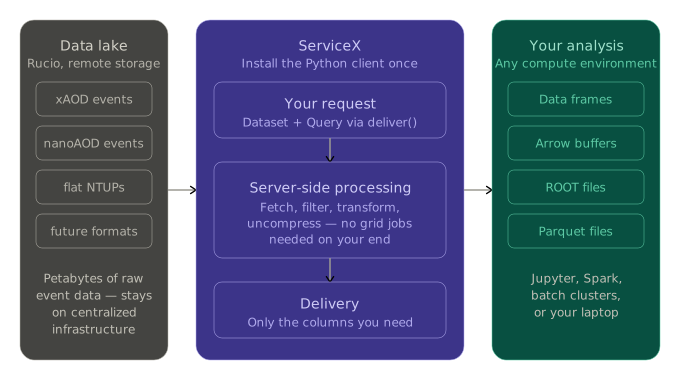
ServiceX is a data delivery service for high-energy physics analyses. Rather than copying entire datasets to user/group directories or local machines, ServiceX retrieves columnar data from remote storage on demand, applies transformations server-side, and delivers only the subset of events and columns the analysis requires in ready to use data formats.
When to use ServiceX
ServiceX is well-suited for the following use cases:
Datasets remain on centralized infrastructure such as Rucio, and only the required subset of events or columns is retrieved
Cuts and analysis selections can be tested interactively without submitting grid jobs
Data can be accessed and transformed without setting up a local analysis environments
Other Resources
Reference Guide
The Reference Guide covers detailed API and configuration information for users already familiar with ServiceX.
Example Workflows
The ServiceX Workflows collection provides end-to-end examples covering common real-world analysis steps.
Guide Format
This guide is organized into the following sections:
Section |
Description |
|---|---|
How to install the ServiceX client and configure credentials |
|
How to request and receive data from ServiceX |
|
How to identify and reference the datasets ServiceX will access |
|
How to filter events and select columns from a dataset |
|
How to interpret and resolve common errors |