Understanding deliver()
You Will Learn:
What the ServiceX Spec is and how to define it
How to add samples with datasets and queries to a Spec
How to pass a Spec to
deliver()and submit transformation requestsHow to access the resulting file paths from the returned dictionary
The deliver() function is the primary interface for ServiceX. It accepts a ServiceX Spec and converts each of its Samples into a transformation request, which is submitted to the backend. Each Sample contains a dataset and a query. ServiceX processes each transformation request and returns the results by downloading files and returning a dictionary mapping each sample’s name to a list of file locations.
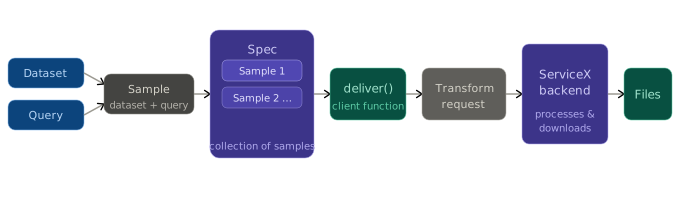
The ServiceX Spec
A ServiceX Spec is a collection of Samples that enables multiple transformation requests in a single call to deliver().
There are three ways to define a Spec. Each example below defines a Spec with two samples using only the name field.
See also
For advanced YAML features beyond the scope of this guide, see YAML Features in the reference documentation.
A plain dict — useful for building specs dynamically at runtime.
spec = {
    "Sample": [
        {"Name": "Sample1"},
        {"Name": "Sample2"},
    ]
}
A ServiceXSpec object — provides full IDE autocompletion and type checking.
from servicex import Sample, ServiceXSpec

spec = ServiceXSpec(
    Sample=[
        Sample(Name="Sample1"),
        Sample(Name="Sample2"),
    ]
)
A path to a .yaml file. The YAML keys mirror the Python field names exactly.
Sample:
    - Name: Sample1
    - Name: Sample2
Samples
Samples are the building blocks of a Spec. Regardless of construction method, each sample requires three pieces of information: a name, one or more datasets, and a query.
Note
The examples below show how each Spec type defines a sample. The dataset and query objects are placeholders — see Specifying Datasets and Building Queries for full details.
from servicex import query, dataset

spec = {
    "Sample": [
        {
            "Name": "Sample1",
            "Dataset": dataset.FileList(),
            "Query": query.UprootRaw()
        },
    ]
}
from servicex import Sample, ServiceXSpec, query, dataset

spec = ServiceXSpec(
    Sample=[
        Sample(
            Name="Sample1",
            Dataset=dataset.FileList(),
            Query=query.UprootRaw(),
        ),
    ]
)
Sample:
    - Name: Sample1
      Dataset: !FileList
        []
      Query: !UprootRaw |
        []
Passing Spec to Deliver
Once the Spec is built, it can be passed to deliver() to convert the samples into transformation requests and submit them to the backend. The following examples show how to call deliver() for each Spec type.
from servicex import deliver

results = deliver(spec)
from servicex import deliver

results = deliver(spec)
from servicex import deliver

results = deliver('spec.yaml')
Accessing the Files
Once the transformation is complete, deliver() returns a Python dictionary mapping each sample name to a list of downloaded file paths. Regardless of Spec type, results are accessed as follows:
sample_1_files = results['Sample1']
sample_2_files = results['Sample2']

print(sample_1_files)
Each key maps to a list of file paths for that sample.